
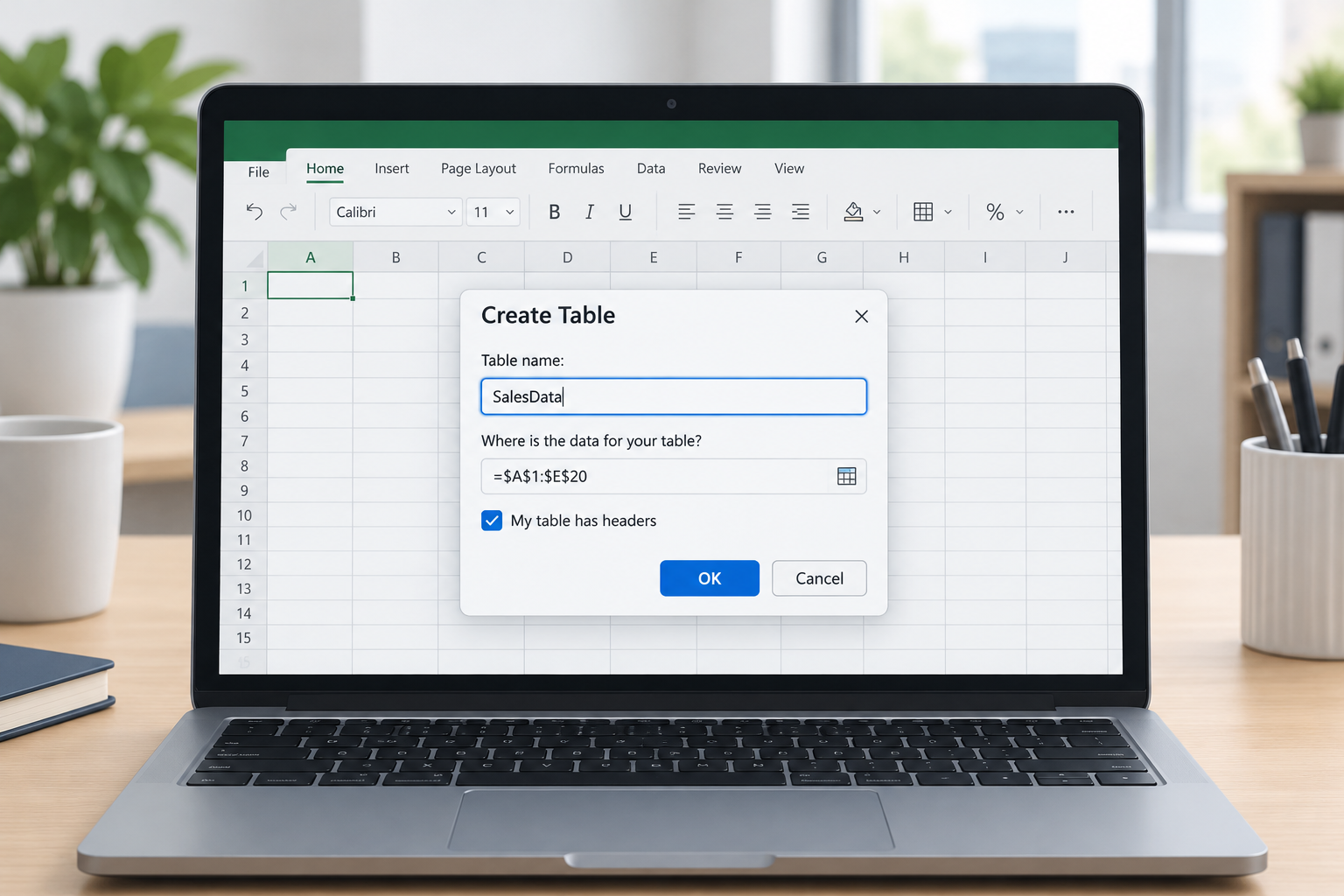
Excel table naming no longer requires a separate step after you build a table. Microsoft now lets you type the name directly into the Create Table dialog box, removing an extra click-through that spreadsheet builders have dealt with for years. This guide explains what changed, why it matters for financial models and trackers, and how to put the update to work right away.
What Changed in Excel Table Naming
Previously, inserting a table in Excel always produced a generic placeholder like Table1 or Table2, and you had to open the Design tab afterward to rename it. The update folds that step into the initial Create Table dialog, so the name field appears the moment you convert a range into a table. For anyone who builds several tables per workbook — think financial models with separate assumption, calculation, and output tables — this removes a repetitive manual task that was easy to skip and hard to clean up later.
The change is rolling out gradually through Microsoft 365 update channels rather than arriving everywhere at once, which is typical for Excel feature rollouts. If you do not see the name field in your Create Table dialog yet, your build may not have received it. Microsoft’s official guide to renaming Excel tables covers the manual rename steps that still apply to tables created before the update.
Why Naming Excel Tables Matters for Financial Models and Trackers
Naming Excel tables properly matters because unnamed tables make formulas harder to audit and reuse. A formula built on Table14[Revenue] tells you nothing about what that table actually contains, while SalesByRegion[Revenue] is self-explanatory the moment someone else opens the file. For small business owners, freelancers, and office admins juggling multiple trackers, that clarity saves real time during review and handoff.
- Financial models often reference several tables in the same workbook — assumptions, outputs, and scenario inputs all need distinct, memorable names.
- Shared trackers get edited by multiple people, and clear table names reduce the chance someone references the wrong data range.
- Reports built with Power Query or Power Pivot pull table names into the data model, so a messy name shows up everywhere downstream.
How to Use the New Excel Table Naming Option When You Create a Table
You can now set a table’s name in the same dialog used to create it, instead of renaming it afterward. The basic flow looks like this:
- Select the range of cells you want to convert into a table.
- Go to Insert > Table, or press the table keyboard shortcut.
- In the Create Table dialog, confirm the range and check “My table has headers” if applicable.
- Enter a descriptive name directly in the name field before confirming.
- Click OK — the table is created with your chosen name already applied.
If your version of Excel has not received the updated dialog yet, you can still rename immediately after creating the table: click any cell inside it, open the Table Design tab, and type a new name into the Table Name box on the left side of the ribbon.
Best Practices for Excel Table Names

Good Excel table names follow a simple pattern: short, descriptive, and consistent across a workbook. Instead of generic defaults, use names that describe the content and, where useful, its purpose — tblExpenses, QuarterlyBudget, or ClientInvoices are all easier to work with than Table3.
Rules to Follow When Naming Excel Tables
Excel enforces a few technical rules when naming Excel tables, and following them avoids errors later in formulas or macros:
- Start the name with a letter, an underscore, or a backslash — never a number or symbol.
- Do not use spaces; use underscores or capitalization instead, such as Monthly_Expenses or MonthlyExpenses.
- Avoid names that look like cell references, such as Q1 or A1.
- Keep names unique within the workbook — Excel will not allow two tables with the same name.
There is also a technical ceiling on length: table names can contain up to 255 characters, though in practice a short, readable name is far more useful than a long one.
Renaming Tables You Already Created
Existing tables with generic names are not affected by the new creation-time field, but renaming them only takes a moment. Click any cell in the table, open the Table Design tab (or the Table tab on Mac), and replace the text in the Table Name box. Because structured references update automatically, any formulas that already point to the old table name will keep working without manual edits.
Structured References and Why Table Names Matter
A clear table name is the foundation of structured references — formulas like SalesData[Revenue] that read far more naturally than traditional cell ranges. Structured references also adjust automatically as a table grows or shrinks, which is one of the main reasons tables are preferred over plain ranges for trackers and recurring reports. When table names are vague, structured references lose much of that readability advantage, even though they still function correctly.
Getting the Most Out of Excel Table Naming in Your Reports
Once naming becomes part of your table-creation habit, it is worth applying a light naming convention across every workbook you build — a short prefix for table type, followed by a descriptive label, works well for most financial models and trackers. Pairing consistent Excel table names with a genuine, up-to-date copy of Excel also matters: older builds may not show the new name field in the Create Table dialog, so it is worth confirming your Office installation is current. If you are setting up a new machine or replacing an outdated license, Microsoft Excel 2024 for Windows and the broader Microsoft Office software lineup give you a straightforward way to get a genuine, supported copy running.
Frequently Asked Questions
How do I rename an existing table in Excel?
Click any cell inside the table, open the Table Design tab (Table tab on Mac), and type a new name into the Table Name box, then press Enter. The change applies immediately and any structured references update automatically.
How do I activate the new Excel table naming option?
There is nothing to turn on manually — the name field appears inside the Create Table dialog once your Microsoft 365 build has received the update. If you do not see it yet, keep using the Table Design tab to rename tables after creation until your version updates.
What are the rules for excel table naming?
Names must start with a letter, underscore, or backslash, cannot include spaces, cannot look like a cell reference such as Z$100 or R1C1, and must be unique within the workbook. Names can be fairly long, but short and descriptive works best for readability.
How do I download and install Excel to get the latest features?
After purchasing a license, you redeem your product key at setup.office.com, sign in with a Microsoft account, download the installer, and run it. Opening any Office app afterward and signing in (or entering the key under File > Account > Activate Product) completes activation.
Can I use structured references without naming my table?
Yes, Excel assigns a default name automatically, so structured references still work. The difference is readability — formulas built on a descriptive name are far easier to audit than ones referencing Table1 or Table2.
