

GitHub Copilot for Eclipse developers has officially gone open source, marking a turning point for the millions of engineers who rely on Eclipse for Java, embedded, and enterprise development. If you’ve been watching VS Code users enjoy slick AI-assisted workflows and wondering when Eclipse would catch up — that moment has arrived. The plugin is free to install, MIT-licensed, and now ships with agent mode and Model Context Protocol (MCP) support on top of the inline code completions that became generally available in March 2025.
What Is the Open-Source Copilot Eclipse Integration?
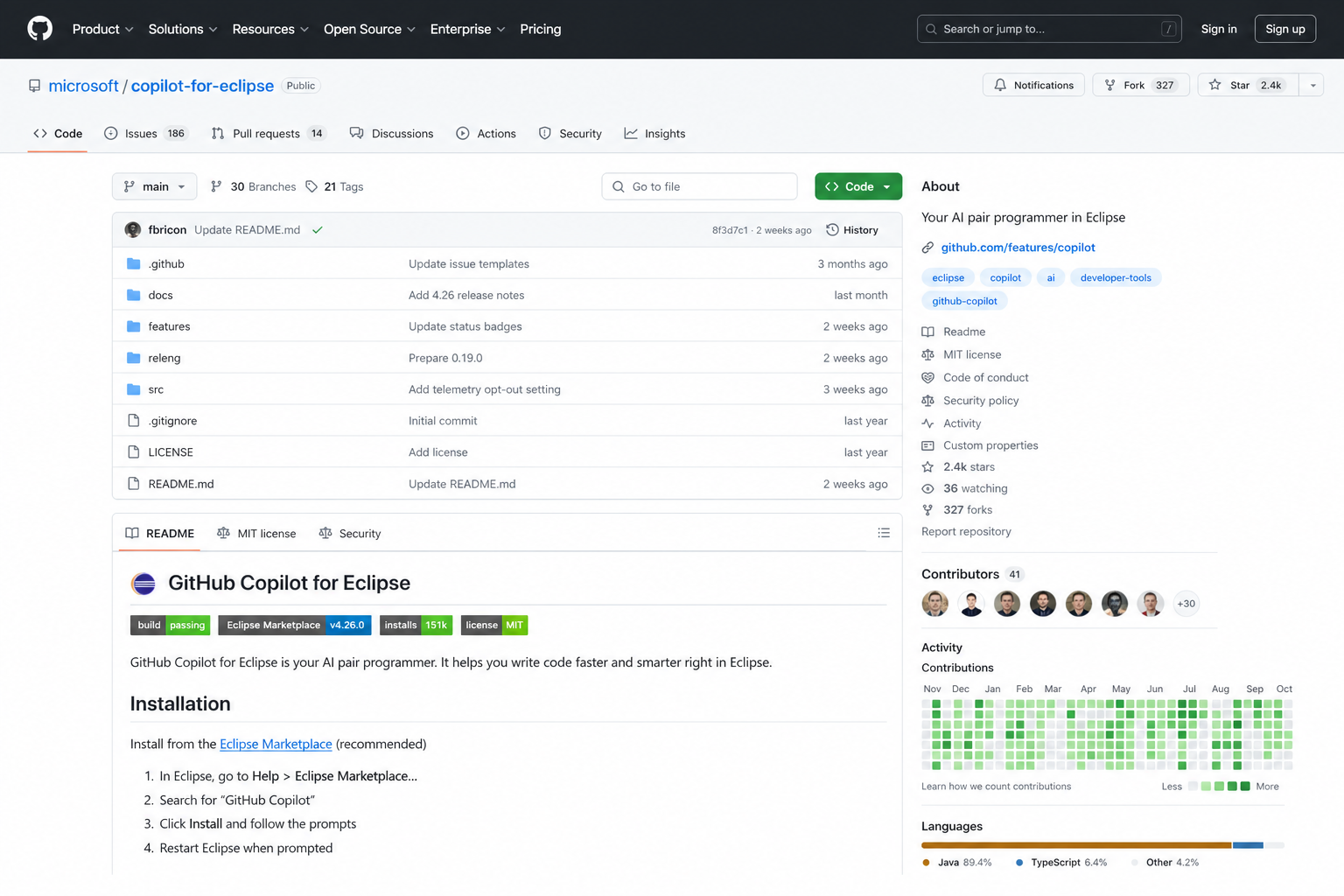
The Copilot for Eclipse plugin is an official release from GitHub and Microsoft, hosted publicly at microsoft/copilot-for-eclipse on GitHub under the MIT licence. Going open source means enterprise teams can now inspect the full implementation behind chat, code completions, and agentic workflows — a transparency advantage that matters enormously in regulated industries and corporate security reviews. The source code exposes exactly how the plugin communicates with GitHub’s Copilot language server, giving teams confidence before rolling it out at scale.
The announcement, published on the GitHub Changelog on 21 May 2026, confirmed that the plugin architecture is built around the same Language Server Protocol (LSP) backbone used by VS Code’s Copilot extension, which is why feature parity has been closing rapidly over the past year.
Key Features of the Copilot Eclipse Plugin
The Eclipse Copilot integration ships with a substantial feature set that now rivals what VS Code developers have enjoyed for longer. Here’s what’s available today:
- Inline code completions — Ghost-text suggestions appear as you type, supporting single-line completions and entire function bodies. This became generally available in March 2025, meaning it is production-ready and no longer in preview.
- Copilot Chat — A conversational panel inside Eclipse lets you ask questions about your code, request refactors, generate tests, and get explanations, all without leaving the IDE.
- Agent mode — Launched to general availability in 2025, agent mode lets Copilot plan and execute multi-step tasks autonomously: creating files, running terminal commands, iterating on build errors, and more.
- Model Context Protocol (MCP) — MCP extends agent mode by connecting the Copilot Eclipse plugin to external tools and services — databases, CI/CD systems, custom APIs — directly from within your Eclipse environment.
- Free tier access — The free GitHub Copilot plan includes up to 2,000 code completions per month, making it accessible without any upfront licence cost.
Eclipse Copilot Integration: System Requirements
Before installing, confirm your environment meets the minimum requirements to avoid compatibility issues:
- Eclipse version: 2024-03 (4.31) or newer is required. If you are running an older release, upgrade first via the Eclipse download page.
- Eclipse TM Terminal: The latest plugin versions depend on TM Terminal being present in your Eclipse distribution. Check Help → About Eclipse IDE → Installation Details to confirm.
- Java runtime: A supported JDK (Java 17+ recommended) installed and configured in Eclipse.
- GitHub account: Any GitHub account — free, Pro, Team, or Enterprise — with Copilot enabled on the subscription.
- Internet access: Required for authentication and real-time model inference.
How to Install the GitHub Copilot for Eclipse Plugin

Installing the Copilot for Eclipse plugin takes under five minutes via the Eclipse Marketplace. Follow these steps exactly:
- Open Eclipse Marketplace — go to Help → Eclipse Marketplace… in the top menu.
- Search for “GitHub Copilot” — the official listing from GitHub will appear at the top of results.
- Click Install — or drag the Install button from the Eclipse Marketplace listing directly into your running Eclipse workspace.
- Accept the licence agreement — review and accept the MIT licence terms when prompted.
- Restart Eclipse — the IDE will prompt you to restart to activate the plugin.
- Sign in to GitHub — after restart, a sign-in prompt appears. Authenticate with your GitHub account through the browser OAuth flow.
- Verify activation — you should see the Copilot status icon in the Eclipse toolbar. Start typing in any editor to trigger your first inline completion.
If you prefer to install via update site URL rather than the Marketplace drag-and-drop, the source repository at microsoft/copilot-for-eclipse documents the direct p2 update site URL in its README.
GitHub Copilot for Eclipse vs VS Code: What Enterprise Developers Need to Know
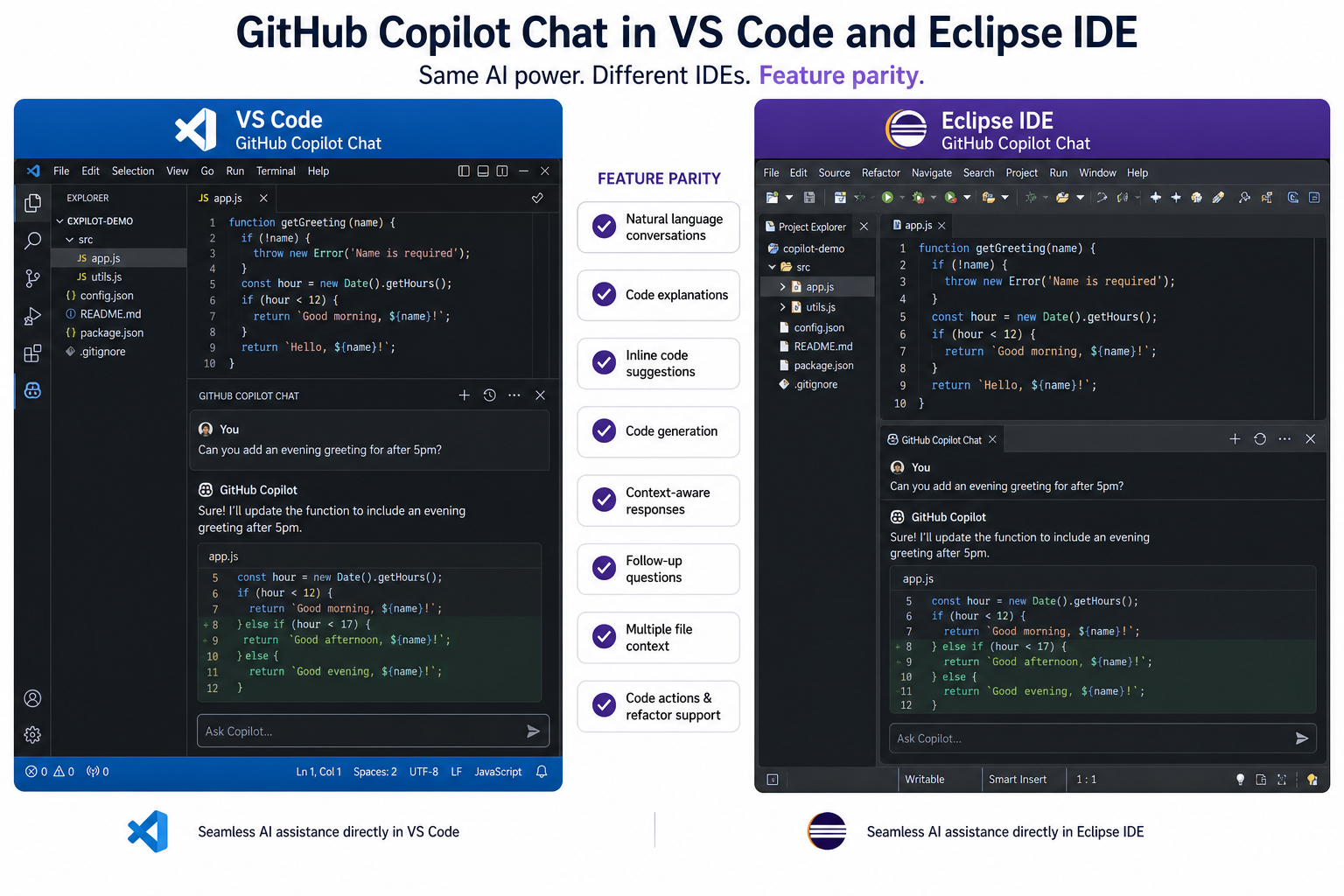
The question most enterprise developers ask is straightforward: does the Eclipse Copilot integration deliver a comparable experience to what VS Code teams already use? The honest answer in mid-2025 is: mostly yes, with a few meaningful differences.
Feature Parity: Closer Than Ever
The move to the LSP-based architecture means the core intelligence — the model, the completion quality, the chat responses — is identical between IDEs. Both the VS Code Copilot extension and the Eclipse plugin call the same GitHub Copilot backend. Agent mode and MCP support, long VS Code exclusives, are now generally available in Eclipse too. For day-to-day Java development, the gap has effectively closed.
Where VS Code Copilot Still Leads
VS Code’s Copilot integration still has a head start in a few areas. The VS Code extension has had multi-file editing (Copilot Edits) and deep workspace indexing for longer, and the VS Code Copilot Chat panel offers a wider set of slash commands and context variables out of the box. The ecosystem of Copilot-compatible VS Code extensions is also more mature — there are more MCP servers documented and tested for VS Code workflows than for Eclipse at the time of writing.
Where Eclipse Copilot Integration Wins for Enterprise Teams
Eclipse remains the IDE of choice for a significant portion of enterprise Java, OSGi, and embedded development. Critical advantages for those teams include:
- Existing toolchain continuity — teams already running Maven, Gradle, JUnit, and Eclipse-specific build tools don’t need to migrate anything. Copilot slots in alongside existing Eclipse workflows.
- Security auditability — the open-source MIT-licensed plugin can be audited, patched, and even self-hosted in air-gapped enterprise environments in ways that closed-source alternatives cannot.
- CDT and embedded development — Eclipse CDT (C/C++ Development Tools) users gain access to Copilot completions inside embedded and systems-level projects where VS Code’s C/C++ tooling remains comparatively weaker for complex cross-compilation setups.
- Familiarity — for teams who have spent years in Eclipse, zero-retraining cost is itself a business case. Copilot for Eclipse is an upgrade, not a migration.
Copilot Pricing: Both IDEs, One Plan
This is worth calling out clearly: GitHub Copilot plans cover all supported IDEs. There is no Eclipse-specific surcharge. The free tier gives 2,000 completions per month; the Copilot Pro plan (billed individually) and Copilot Business/Enterprise plans (billed per seat at the organisation level) all work identically whether your developers are in VS Code, Eclipse, JetBrains, or Xcode. For enterprise teams standardising on a single AI coding assistant licence, this cross-IDE coverage is a strong value argument.
Agent Mode and MCP: The Game-Changer for Eclipse Developers
Agent mode is arguably the most significant feature to land in the Copilot Eclipse plugin. Where inline completions help with the next few lines, agent mode handles entire tasks. You describe what you want in the Copilot Chat panel — “add input validation to all form handlers in this package and write corresponding unit tests” — and Copilot will plan the steps, make the edits across multiple files, run the tests, interpret any failures, and iterate until the task is complete or it needs your input.
MCP amplifies this further. By connecting the Eclipse Copilot integration to an MCP server for, say, your company’s internal API documentation or a database schema service, Copilot can answer questions and generate code that is grounded in your organisation’s actual data context — not just the public training data. This is a capability that enterprise Copilot Business and Enterprise subscribers can deploy today.
Is This the Right Time to Adopt Copilot for Eclipse?
For enterprise Java developers, the timing is genuinely good. Code completion has been generally available since March 2025, agent mode reached general availability shortly after, and going open source removes the last major objection for security-conscious organisations. The free tier lowers the barrier to evaluation — a developer can install the Copilot for Eclipse plugin, try 2,000 completions, and build a business case without spending a pound or a dollar upfront.
If your team is already tracking how AI tools are reshaping development cost and velocity, this is the moment to run a structured pilot. For broader context on how Microsoft’s AI infrastructure decisions shape the features that reach you, see our deep-dive on AI model infrastructure costs and Microsoft Copilot. And if you’re managing Copilot across a Microsoft-heavy stack and want to understand how the broader ecosystem fits together, our look at Copilot vs Gmail Gemini integration covers the productivity assistant landscape in detail.
FAQ: GitHub Copilot for Eclipse Developers
Does GitHub Copilot for Eclipse work with Eclipse 2023 or older versions?
No. The official plugin requires Eclipse 2024-03 (version 4.31) or newer. If you are running an older Eclipse release, you will need to upgrade your IDE before installing the Copilot plugin. Older community workarounds existed, but the official GitHub-supported plugin dropped backward compatibility to maintain a stable, supportable baseline.
Is the Copilot Eclipse plugin truly free?
The plugin itself is free and open source under the MIT licence. You do need a GitHub account with a Copilot plan enabled. The free GitHub Copilot tier includes 2,000 code completions per month, which is enough for individual evaluation. Teams and enterprises will need a paid Copilot Business or Enterprise seat — pricing is per user per month at the organisation level.
Can I use agent mode on the free Copilot plan in Eclipse?
Agent mode is available in Eclipse and was confirmed generally available in 2025. Whether your specific plan tier includes agent mode usage depends on GitHub’s current plan terms — check GitHub’s official Copilot plans page for the latest seat-by-seat breakdown, as feature access can vary between Free, Pro, Business, and Enterprise tiers.
How does the open-source Eclipse plugin differ from VS Code’s Copilot extension?
Both plugins share the same underlying Copilot language server and model backend, so completion quality is equivalent. The Eclipse plugin is now also MIT-licensed and open source, matching VS Code’s Copilot extension in terms of code visibility. VS Code currently has a slightly larger ecosystem of pre-configured MCP servers and more mature multi-file editing workflows, but Eclipse has closed the gap significantly in 2025.
Do I need a separate licence if I use both VS Code and Eclipse?
No. A single GitHub Copilot subscription covers all supported IDEs simultaneously. You can switch between VS Code, Eclipse, JetBrains IDEs, and Xcode using the same GitHub account and the same plan. There is no per-IDE licensing charge.
What is MCP and why does it matter in Eclipse?
Model Context Protocol (MCP) is an open standard that lets Copilot’s agent mode connect to external tools, services, and data sources. In Eclipse, this means you can wire up Copilot to your company’s internal documentation servers, database schemas, or CI/CD APIs. The result is AI assistance that understands your specific codebase context beyond what’s in the open source training data — a major step forward for enterprise customisation.
