

A Microsoft Office one-time purchase lets you pay a single upfront fee and keep using Word, Excel, and PowerPoint for as long as you like — no monthly bill, no auto-renewal, no surprises. In 2026, perpetual Office licences remain widely available and, for many users, represent a smarter, more cost-effective alternative to a Microsoft 365 subscription. This guide walks you through every version available, how to choose the right one, how activation works, and where to find the best deal.
What Is a Office perpetual license?
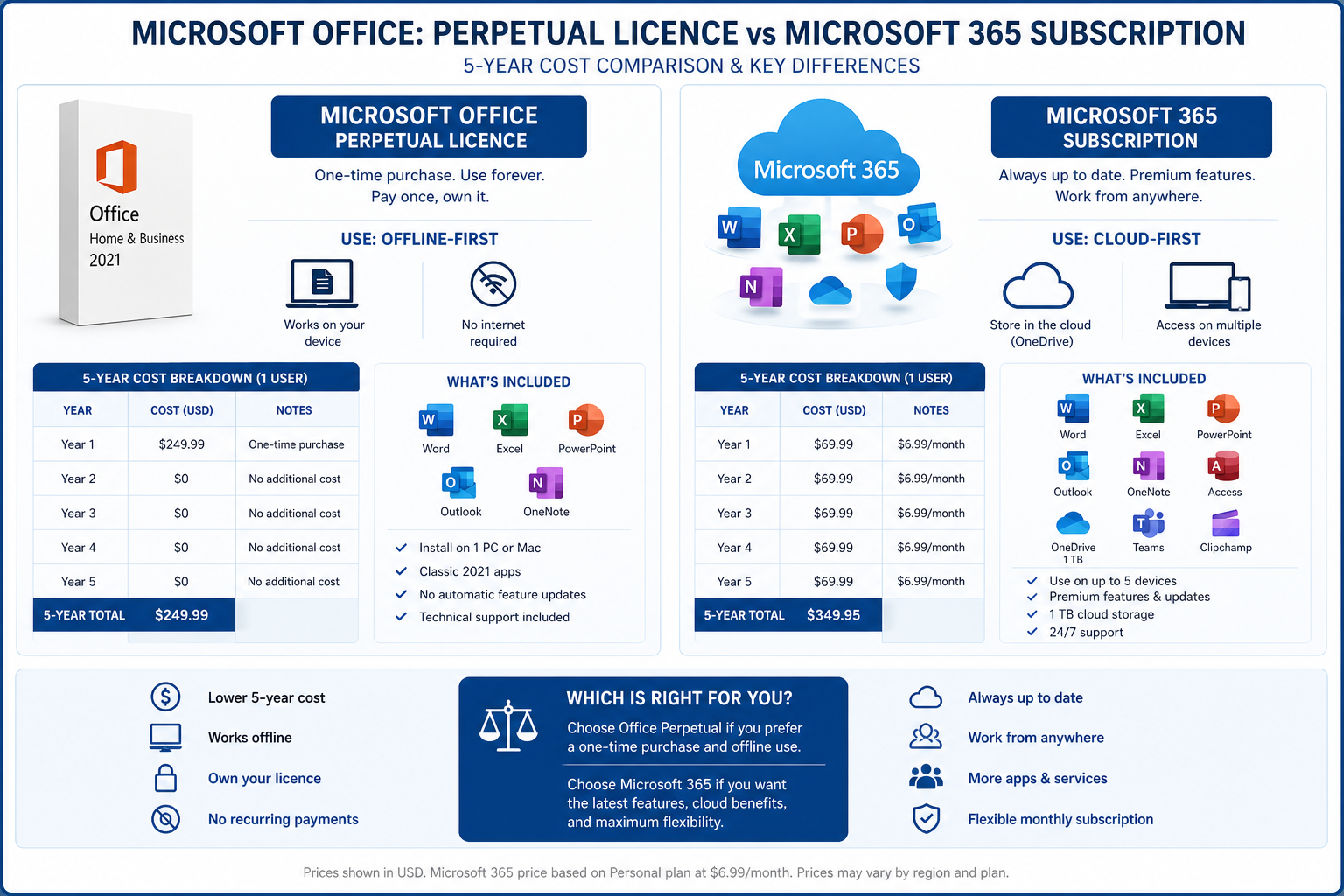
An Office perpetual licence — also called an Office lifetime license — grants you permanent access to a fixed version of the Microsoft Office suite. Unlike Microsoft 365, which requires an ongoing subscription (currently from around £6/month or £60/year for Personal), a perpetual licence is a one-and-done transaction. You download the software, enter your product key, and it’s yours indefinitely.
Microsoft itself confirms this distinction on its support pages: perpetual Office products are activated once against a product key and remain functional without any further payment. The trade-off is that you won’t receive feature upgrades — security patches and bug fixes continue within the mainstream support window, but new tools (like Copilot AI) are reserved for Microsoft 365 subscribers.
According to Microsoft’s official comparison page, Office 2024 is a one-time purchase that includes the core apps, while Microsoft 365 is a subscription that adds cloud storage, AI features, and continuous updates.
Microsoft Office One-Time Purchase Versions Available in 2026
When you decide to buy Office once, the version you choose matters. Here is a quick breakdown of what is currently on the market:
-
Office 2024 Pro Plus (Windows): The most current perpetual release, launched on 1 October 2024. Includes Word, Excel, PowerPoint, Outlook, OneNote, Access, and Publisher. Supported by Microsoft until 2029. Available at ShopKeyOnline from €24.50.
-
Office 2021 Pro Plus (Windows): Still a strong performer and budget favourite. Important caveat: Microsoft mainstream support ends October 2026, so factor that into your decision. From €19.15 (OEM) or €28.95 (Retail Key) at ShopKeyOnline.
-
Office 2019 Pro Plus (Windows): An older but capable suite. Suited for legacy hardware or very conservative IT environments. From €18.95.
-
Office 2016 Pro Plus (Windows): End-of-life but still activatable. Only recommended if you have a specific compatibility requirement. From €13.95.
-
Mac editions: Office Home 2024 for Mac is available from €115.95, with Home & Business options also on offer.
For most users upgrading in 2026, Office 2024 Pro Plus is the logical choice — it carries the longest remaining support life and includes the latest offline feature set.
Office Perpetual License vs Microsoft 365: A Honest Comparison
Choosing between a perpetual licence and a subscription comes down to how you work and how long you plan to keep the software.
Cost Over Time
Microsoft 365 Personal costs approximately £59.99/year in the UK. Over five years, that is £300 — and the meter keeps running. By contrast, an Office perpetual license purchased for around €25–€29 breaks even in well under a single year. If you use Office for 3–5 years without needing new AI features, the lifetime licence wins on cost every time.
Features and Updates
Microsoft 365 bundles 1 TB of OneDrive storage, Microsoft Copilot AI integration, and continuous app feature updates. If you live in the cloud, collaborate heavily, or need the absolute latest tools, the subscription has genuine value. Perpetual buyers get a stable, proven app suite — but features are frozen at launch.
Licence Portability
OEM licences are tied to the original PC and cannot be moved. Bind-to-account licences offer more flexibility — they can be transferred to a new machine after linked to your Microsoft account, making reinstallation straightforward. Always check the licence type before purchasing.
Which Microsoft Office One-Time Purchase Is Right for You?
Use this quick selector to match your situation to the best deal:
-
Home user, Windows PC, tight budget: Office 2021 Pro Plus OEM at €19.15 is hard to beat — full Pro Plus apps, instant delivery, and solid performance for everyday tasks.
-
Home user wanting the latest version: Office 2024 Pro Plus at €24.50 delivers the newest perpetual release with support until 2029.
-
Business or power user: The Office 2024 Pro Plus Retail key gives you portability across machines — worth the slightly higher price for professional environments.
-
Mac user: Office Home 2024 for Mac or Home & Business 2024 covers the Mac-native apps with full activation via your Apple ID or Microsoft account.
-
Student or occasional user: Office Home & Student editions include the core trio (Word, Excel, PowerPoint) at lower prices — ideal if you do not need Outlook or Access.
-
Windows + Office bundle buyer: A bundled Windows 11 Pro + Office 2021 Pro Plus Retail deal from €36.90 can cut total spend significantly versus buying licences separately.
How to Activate Your Office One-Time Purchase
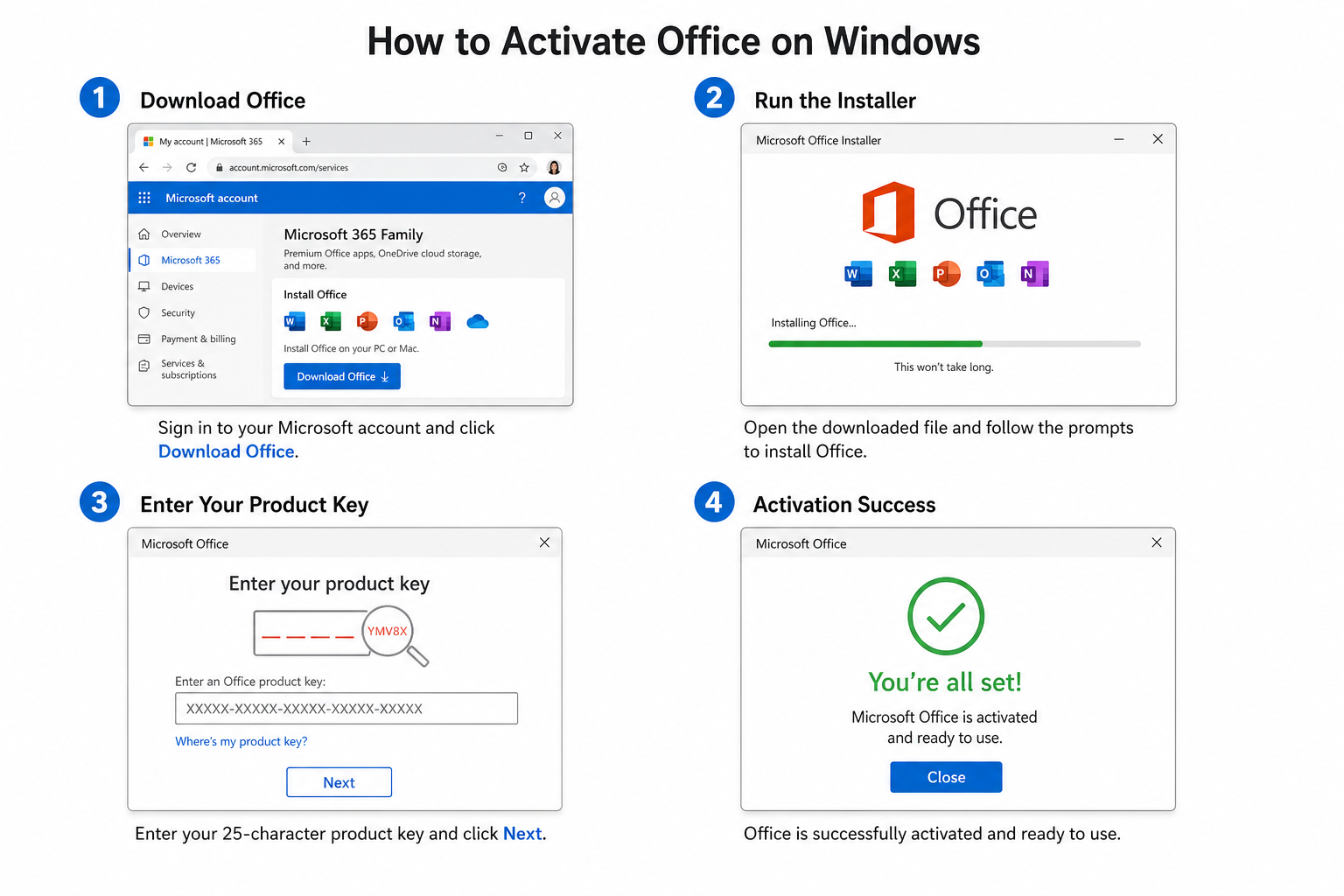
Activating a perpetual Office lifetime license is straightforward. Here are the steps that apply to most Windows and Mac installations:
-
Download the installer. After purchasing, you will receive an email with your product key and the official Microsoft download link. Use only the official link provided — never a third-party download.
-
Run the installer. Open the downloaded .exe (Windows) or .pkg (Mac) file and follow the on-screen prompts to complete installation.
-
Launch any Office app. Open Word, Excel, or PowerPoint. You will be prompted to activate.
-
Enter your product key. On Windows, choose “Activate with a product key” and type in the 25-character key. On Mac, you may be prompted to sign in to your Microsoft account and then enter the key.
-
Complete activation online. Office connects to Microsoft’s servers to validate the key. A confirmed activation message appears when successful.
-
Bind to account (where applicable). For bind-to-account licences, you sign in to your Microsoft account during activation, which locks the licence to that account for easy reinstallation later.
Microsoft’s own Activate Office for Windows guide provides the authoritative reference for troubleshooting activation issues, including the Activation Wizard steps.
OEM vs Bind To Account: Understanding the Licence Types
When you buy Office once, you will encounter two main licence formats beyond the standard retail box:
OEM Licences
OEM (Original Equipment Manufacturer) licences are linked to the hardware they are first activated on. They are non-transferable but are typically the most affordable option. If you are buying for a PC that will not change, an OEM licence is perfectly fine.
Bind-to-Account Licences
A bind-to-account licence is attached to your Microsoft account rather than just a product key. This makes reinstallation extremely simple — log in to your account and the licence is already there. ShopKeyOnline offers bind-to-account options for Office 2024, Office 2021 and Office 2019.
Is Buying Office Once Still Worth It in 2026?
The honest answer is: yes, for the majority of users. If your needs centre on document creation, spreadsheets, presentations, and email — and you are not reliant on bleeding-edge AI or real-time collaboration features — a Microsoft Office one-time purchase delivers everything you need at a fraction of the long-term subscription cost.
The one scenario where a subscription wins is heavy cloud and AI use. Microsoft Copilot, co-authoring in real time, and 1 TB of OneDrive storage are exclusively tied to Microsoft 365. But for solo workers, students, and small businesses that primarily work offline, paying €19–€29 once instead of £60+ every year is a compelling financial case.
Bear in mind that Office 2021 mainstream support ends in October 2026. If you are buying new, go straight to Office 2024 Pro Plus — it runs until 2029 and represents the best value perpetual licence available right now.
Frequently Asked Questions
What is the difference between a Microsoft Office one-time purchase and Microsoft 365?
A one-time purchase (perpetual licence) gives you a fixed version of Office that you own outright with no recurring fee. Microsoft 365 is a subscription that provides continuous updates, Copilot AI integration, and 1 TB of OneDrive storage, but requires ongoing payment. Once you stop paying for Microsoft 365, access to the apps is lost.
Can I install my Office lifetime license on more than one PC?
It depends on the licence type. Most perpetual licences — OEM and standard Retail — are for a single device. Some Home & Family editions permit multiple installs. Always check the licence terms at point of purchase. Retail and bind-to-account licences can be moved to a new machine if you deactivate the old one first.
Does Office 2024 work on Windows 10?
Yes, Office 2024 supports Windows 10 (version 19041.0 or later) and Windows 11. It also has a native Mac version. Note that Windows 10 itself reaches end of life in October 2025, so if you are on Windows 10, consider whether a Windows upgrade is also on your roadmap.
What happens when my perpetual Office version reaches end of support?
Microsoft stops issuing security patches after the mainstream support end date. The software continues to function but may become vulnerable over time. For Office 2021, that date is October 2026. For Office 2024, it is 2029. Most users will be comfortable using the software beyond end of support for a period, but upgrading to a newer licence is the safest long-term approach.
Is it safe to buy Office keys from third-party retailers?
Buying from reputable, established digital licence retailers is safe provided the keys are genuine. ShopKeyOnline supplies original activation keys with a 100% money-back guarantee — if a key fails to activate, you receive a replacement or full refund. Avoid auction sites and anonymous sellers with no verifiable return policy.
