

WSL Containers on Windows 11 let developers build and run Linux containers natively — no Docker Desktop licence, no heavy VM overhead, no compromise. Announced at Microsoft Build 2026 and now in public preview, this native containerisation layer is the most significant shift in Windows development workflows in years, and it directly targets the friction developers have lived with since Docker Desktop’s commercial licensing changes in 2022.
What Are WSL Containers?
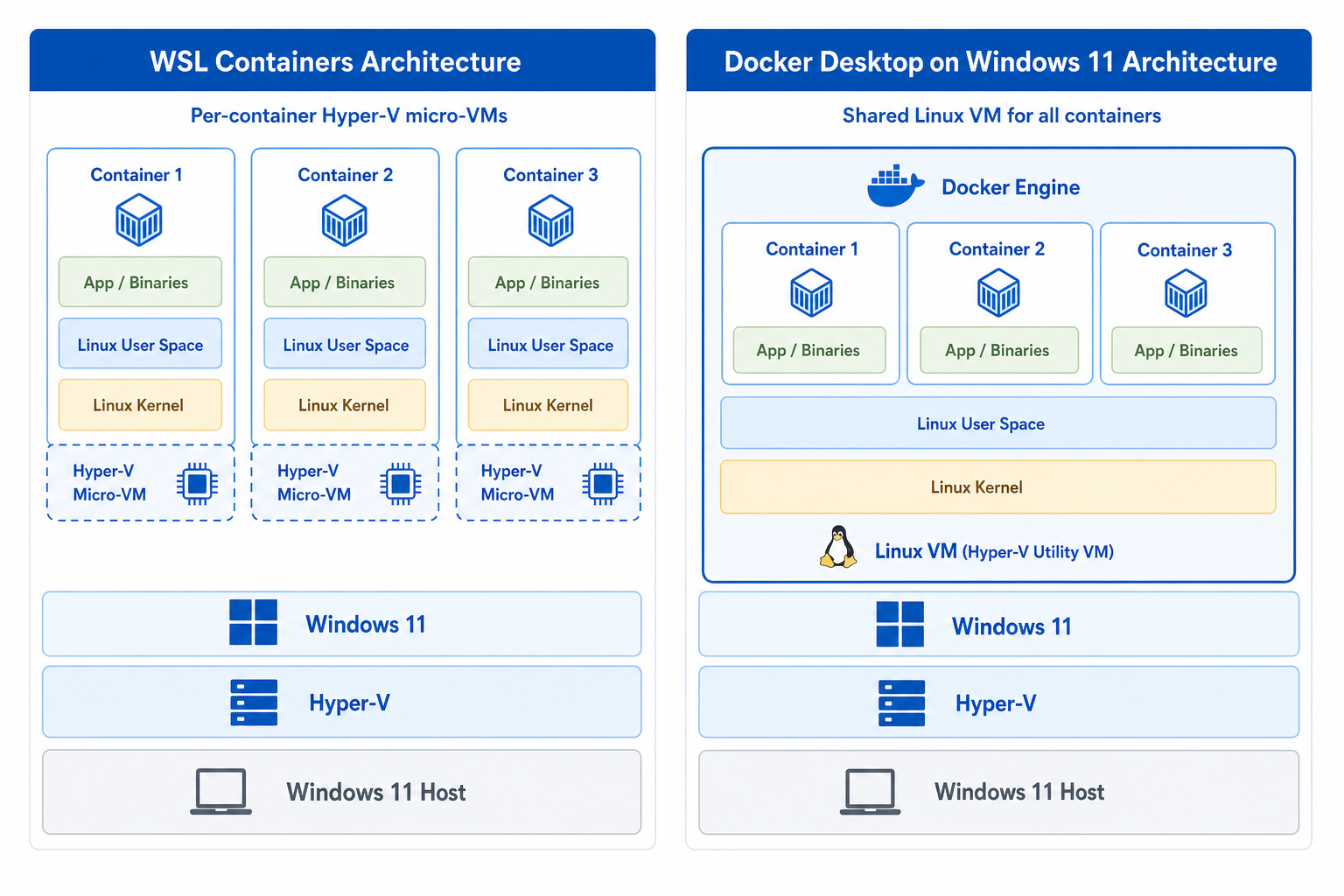
WSL Containers — accessed through a new CLI called wslc.exe — bring Linux container support directly into the Windows Subsystem for Linux engine. Rather than spinning up a separate VM to host a Docker daemon, Windows 11 manages dedicated Hyper-V micro-VMs for each container, giving every workload its own isolated storage, networking, and resource budget. The result is a tighter security model and a startup experience that feels far closer to running containers on native Linux than anything Docker Desktop has offered on Windows.
Unlike Docker Desktop, which requires a paid subscription for businesses with more than 250 employees or $10 million in revenue, WSL Containers ship as part of Windows itself. For teams watching software licensing costs, that distinction matters immediately.
WSL Containers vs Docker Desktop: Key Differences
Understanding where WSL containerisation pulls ahead — and where Docker Desktop still holds ground — is the first step before planning any migration.
- Licensing cost: WSL Containers are included with Windows 11 at no additional charge. Docker Desktop requires a paid Pro, Team, or Business subscription for commercial use.
- Architecture: WSL Containers use per-container Hyper-V isolation by default, whereas Docker Desktop on Windows historically shared a single Linux VM across all containers.
- CLI surface: The new
wslcCLI mirrors familiar Docker commands closely, so muscle memory largely transfers. Image names, port flags, and volume mounts work as expected. - VS Code integration: Microsoft has already updated the Dev Containers extension — change the “Docker Path” setting to
wslcand your existing devcontainer workflows continue without modification. - Ecosystem maturity: Docker Desktop has years of third-party integrations, GUI tooling, and community support. WSL Containers are in public preview — production-critical pipelines deserve a parallel testing phase first.
How to Set Up WSL Containers on Windows 11
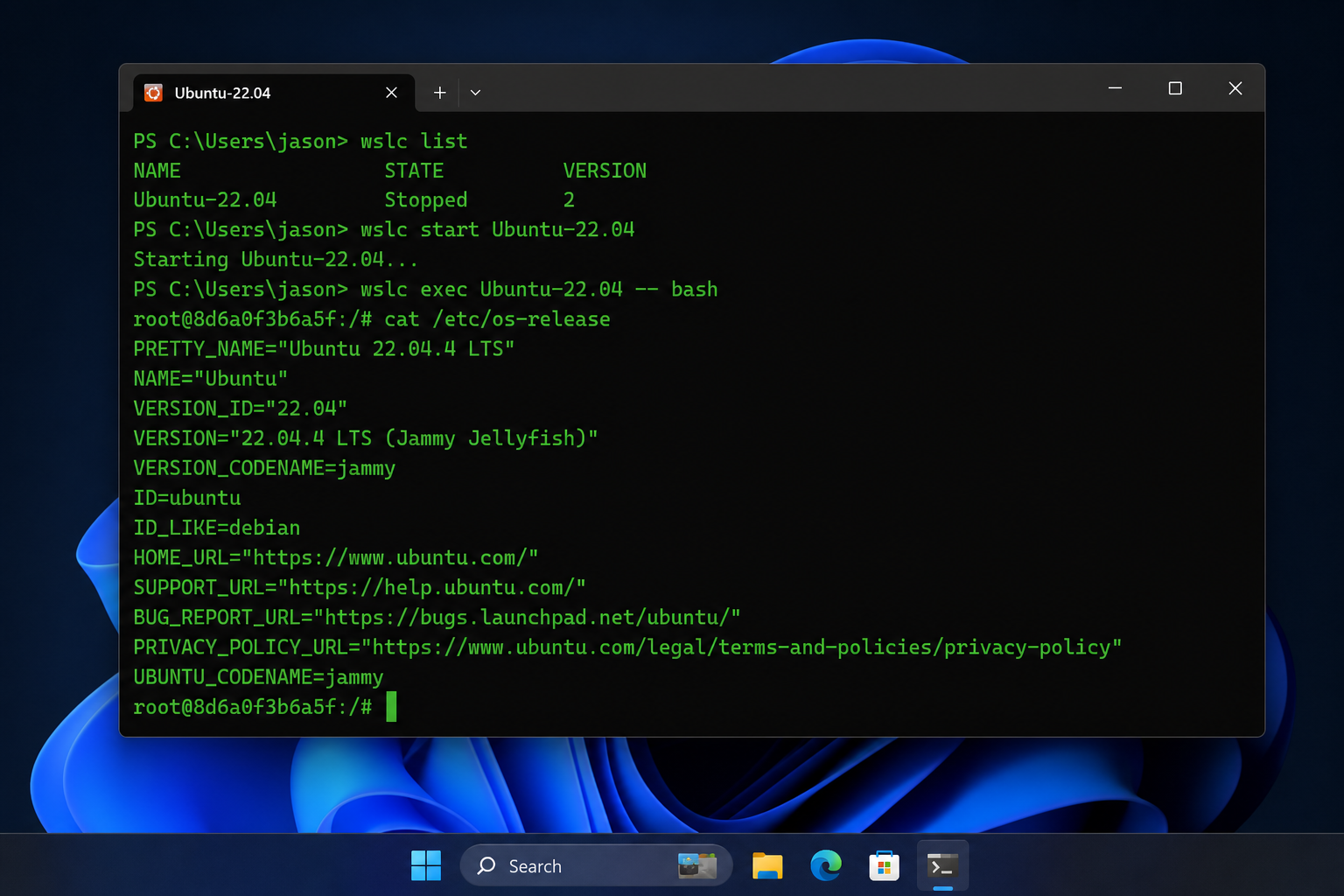
Getting started with native Linux containers on Windows takes under ten minutes on a machine already running WSL 2. Follow these steps carefully — the feature is in public preview, so requirements may tighten at general availability.
Prerequisites
- Windows 11 (build 26100 or later recommended — check via
winver) - WSL 2 installed and updated (
wsl --updatefrom an elevated prompt) - Hyper-V enabled (required for per-container isolation)
- At least 8 GB RAM; 16 GB recommended for multi-container workloads
Installation Steps
- Open Windows Terminal as Administrator.
- Run
wsl --updateto pull the latest WSL kernel that includes the container runtime. - Install the WSL container CLI:
wsl --install-feature containers. - Verify the install with
wslc --version— you should see the preview build string. - Pull your first image:
wslc pull ubuntu:24.04. - Run a container:
wslc run -it ubuntu:24.04 bash.
For teams using VS Code Dev Containers, open your settings JSON and set "docker.dockerPath": "wslc". Reopen any existing devcontainer project and the extension will route all container commands through wslc automatically. Microsoft’s official step-by-step documentation is the authoritative reference for keeping up with preview changes: see the Get started with containers on WSL guide on Microsoft Learn.
Performance Gains: What the Architecture Change Means
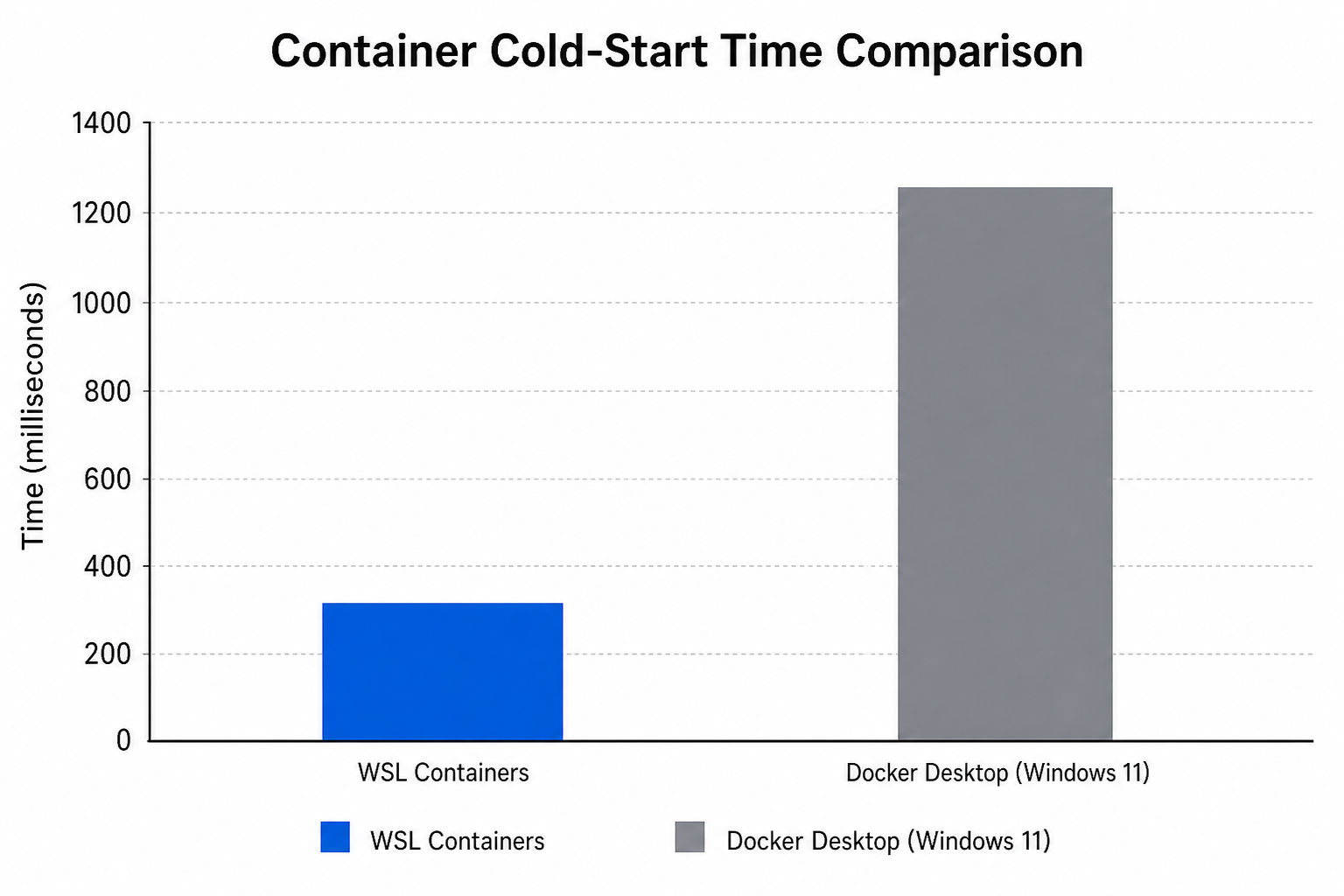
The per-container Hyper-V VM model in WSL containerisation is not just a security upgrade — it has real performance implications for development teams.
Because each container gets its own lightweight VM rather than sharing a single monolithic Linux VM, resource contention between containers drops significantly. Teams running 10–20 concurrent containers during integration testing reported noticeably faster cold-start times in early previews, and memory reclaim is more aggressive because each VM releases pages independently. File I/O through the WSL filesystem layer has also improved in recent WSL kernel updates, addressing one of the longest-standing complaints developers had when running Docker Desktop on Windows — slow bind mounts compared to native Linux.
That said, the first pull of a large image will still take time proportional to your connection speed. The container image cache is stored within the WSL data directory on your Windows drive, so placing that directory on an NVMe SSD rather than a spinning disk will make the biggest single impact on day-to-day container launch speed.
Which Teams Should Migrate First?
Not every team should race to swap Docker Desktop for WSL containers today — but some workflows are obviously better candidates than others.
Migrate Now: Dev Container and CI/CD Teams
If your developers spend most of their time inside VS Code Dev Containers and your CI/CD pipelines run on self-hosted Windows agents, the migration path is the lowest-risk. The wslc CLI is intentionally familiar, VS Code already supports it via a single settings change, and you eliminate a recurring per-seat licensing cost immediately. Teams of 10 developers on Docker Desktop Business, for example, are currently paying around $210 per month — switching to WSL Containers makes that line item disappear.
Migrate With Testing: Compose-Heavy Workflows
Docker Compose support in WSL containerisation is confirmed but still evolving in the public preview. Teams relying on complex multi-service docker-compose.yml files should run WSL Containers in parallel with Docker Desktop for four to six weeks, validating that networking between services, volume persistence, and environment variable injection all behave identically before cutting over entirely.
Wait and Watch: Kubernetes and Rancher Desktop Users
If your local development environment uses Kubernetes — either through Docker Desktop’s built-in k8s cluster, Rancher Desktop, or minikube — there is no WSL Docker alternative that replaces that orchestration layer yet. Microsoft has not announced a Kubernetes integration for WSL Containers in the current preview. Stay on your existing toolchain and revisit at general availability.
Licensing Clarity: Windows 11 Pro Is the Right Foundation
WSL Containers require Hyper-V, which is only available on Windows 11 Pro, Enterprise, and Education editions — not Windows 11 Home. If your development machines are running Home, you will need to upgrade the edition before the feature is available to you. ShopKeyOnline carries Microsoft Windows 11 Pro Retail keys from €17.95, delivered instantly by email, making the edition upgrade straightforward without hunting for a boxed copy.
For teams equipping multiple developer workstations at once, the Windows 11 Pro OEM licence at €15.95 is a cost-effective per-machine option. Both options come with official Microsoft download links and a 100% money-back guarantee if activation fails — so there is no risk in making the switch.
Frequently Asked Questions
Do I need to uninstall Docker Desktop before using WSL Containers?
No. You can run both side by side during your evaluation period. WSL Containers and Docker Desktop use separate runtimes and do not conflict. Most teams keep Docker Desktop installed for a few weeks while they validate that wslc handles all their workloads before removing it.
Can I use existing Docker images with WSL Containers?
Yes. WSL Containers pull from standard OCI-compliant registries — Docker Hub, GitHub Container Registry, Azure Container Registry, and private registries all work exactly as they do with Docker. Your existing image names, tags, and private registry credentials carry over without modification.
Is WSL containerisation available on Windows 11 Home?
No. Hyper-V isolation — which WSL Containers depend on — is not available on Windows 11 Home. You will need Windows 11 Pro, Enterprise, or Education. Upgrading from Home to Pro is the only prerequisite that may catch developer machines off-guard, particularly on consumer laptops purchased with Home pre-installed.
Will WSL Containers work with GitHub Codespaces or Azure DevOps pipelines?
GitHub Codespaces runs in the cloud and is unaffected by local toolchain changes. For Azure DevOps self-hosted agents on Windows, you can configure the agent to invoke wslc in place of docker — but test this in a staging pipeline first, since some Azure DevOps tasks hard-code the Docker binary path. Microsoft’s documentation covers agent configuration in detail.
Is the WSL Docker alternative production-ready?
As of mid-2026, WSL Containers are in public preview — meaning APIs and CLI flags can still change. Microsoft recommends against using the preview in production-critical CI/CD pipelines. For local development and experimentation, it is stable enough for daily use. General availability, with full support guarantees, is expected later in 2026.
