

The August 2026 Patch Tuesday update has delivered an unwelcome surprise: a printer PDF bug that stops millions of Windows 11 users from printing documents or exporting PDFs across a wide range of applications. The culprit is a flaw inside Microsoft’s .NET Framework cumulative update (KB5120708), and the impact is far broader than a simple driver glitch. If your printer stopped working or your PDF exports are throwing errors after the latest update, you are not alone — and there are confirmed workarounds you can apply right now.
What Is the August 2026 Windows 11 Printer PDF Bug?
This is a Windows 11 print error caused by a security hardening change inside the August 2026 .NET Framework update. Microsoft introduced new overflow protections inside the TrueType font subsetting engine used by Windows Presentation Foundation (WPF) applications. That protection, while well-intentioned, introduced a breaking change: any WPF app that tries to print or generate a PDF now hits a System.IO.FileFormatException and fails silently or crashes entirely.
The update in question — KB5120708 (cumulative update for .NET Framework 3.5 and 4.8.1 for Windows 11, released 11 August 2026) — affects Windows 11 versions 25H2, 24H2, and, critically for many business users, systems already running or preparing for 26H2. Companion updates KB5120705 and KB5120710 carry the same defect across other supported Windows versions and .NET builds.
Which Applications Are Affected by the PDF Rendering Failure?
This PDF rendering failure does not strike every application equally — only those built on WPF are vulnerable. That said, WPF underpins a surprisingly large slice of the enterprise software landscape.
- Accounting and tax software built on .NET (including CCH and similar platforms)
- Line-of-business desktop applications developed in WPF
- Custom in-house tools that use the Windows print spooler via WPF APIs
- Any application that calls WPF’s built-in PDF export or XPS printing pipeline
- Document management and legal software relying on .NET 4.x or .NET 8 WPF
Consumer apps such as Chrome, Edge, Acrobat Reader, or Microsoft Word do not use WPF’s printing stack directly and are largely unaffected. The pain is concentrated in business and enterprise environments where bespoke or niche WPF tools are the daily workhorse.
The Root Cause: A Security Fix That Broke Printing
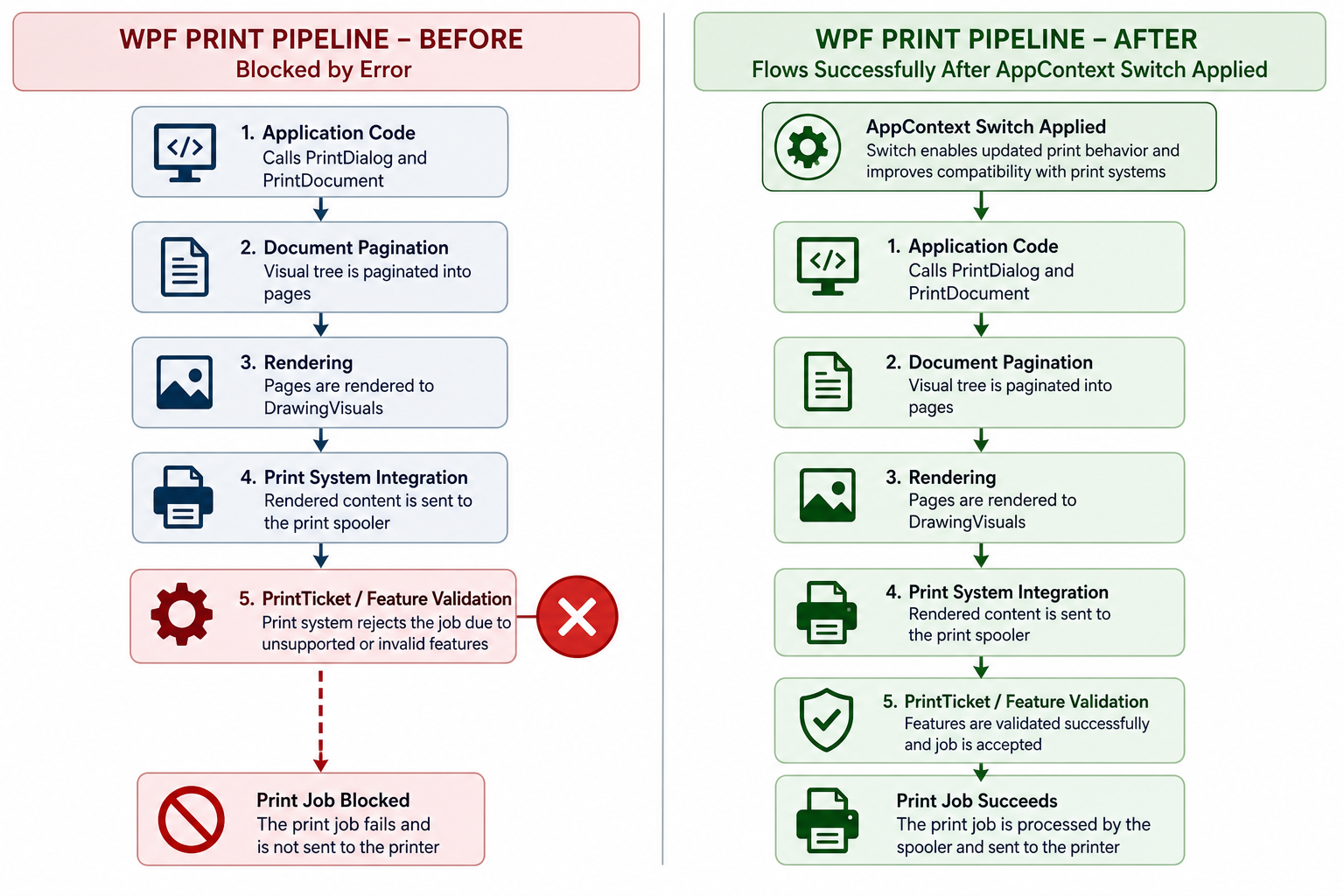
Understanding the root cause helps you choose the right fix. Microsoft’s August update added overflow checks to the CMap and SBIT tables inside the TrueType font delta (TtfDelta) engine — a component responsible for subsetting fonts when preparing a document for the printer or a PDF renderer. The new check is designed to prevent a class of memory-safety vulnerability, but it incorrectly flags valid font data in many documents as malformed, throwing FileFormatException and halting the entire print or export job.
According to BleepingComputer’s reporting on the August 2026 WPF printing bug, Microsoft acknowledged the issue publicly on 22 August 2026 — ten days after the original patch shipped — and confirmed it is actively working on a permanent fix to be delivered through Windows Update. Until that arrives, Microsoft has offered an interim workaround.
Official Workarounds for the Windows Printing Fix
Microsoft’s official Windows printing fix comes in the form of an AppContext switch that tells the .NET runtime to disable the new CMap and SBIT overflow protection. This is not a perfect solution — you are temporarily trading back the security hardening to restore functionality — but it is the only confirmed path Microsoft currently supports.
Workaround 1: AppContext Switch via App Config File
This is the recommended approach for most users and IT administrators. It targets only the affected application without touching system-wide settings.
- Locate the application’s configuration file — typically
YourApp.exe.configin the application’s installation folder. - Open the file in Notepad or any plain-text editor (run as Administrator if needed).
- Inside the
<runtime>section, add the following switch:<AppContextSwitchOverrides value="Switch.MS.Internal.TtfDelta.DisableCmapAndSbitOverflowProtection=true" /> - Save the file and restart the application.
- Test printing or PDF export — the
FileFormatExceptionshould no longer appear.
If no <runtime> section exists, create one inside the <configuration> root. IT administrators deploying this change across a fleet can push the config file edit via Group Policy Preferences or a scripted deployment tool.
Workaround 2: AppContext.SetSwitch in Application Code
For developers who have access to source code and can recompile, the cleaner approach is to call the switch programmatically at application startup:
- Open your application’s entry point (usually
App.xaml.csorProgram.cs). - Before the main window or any print operations initialise, add:
AppContext.SetSwitch("Switch.MS.Internal.TtfDelta.DisableCmapAndSbitOverflowProtection", true); - Recompile and redeploy. The switch takes effect at runtime and does not require any config-file changes.
Workaround 3: Roll Back the .NET Update (Last Resort)
If neither AppContext approach is viable — for example, you cannot access the vendor’s config file and the software supplier has not yet released a patch — you can uninstall KB5120708 to restore printing. This is a last resort because it removes the security protections the update was intended to deliver.
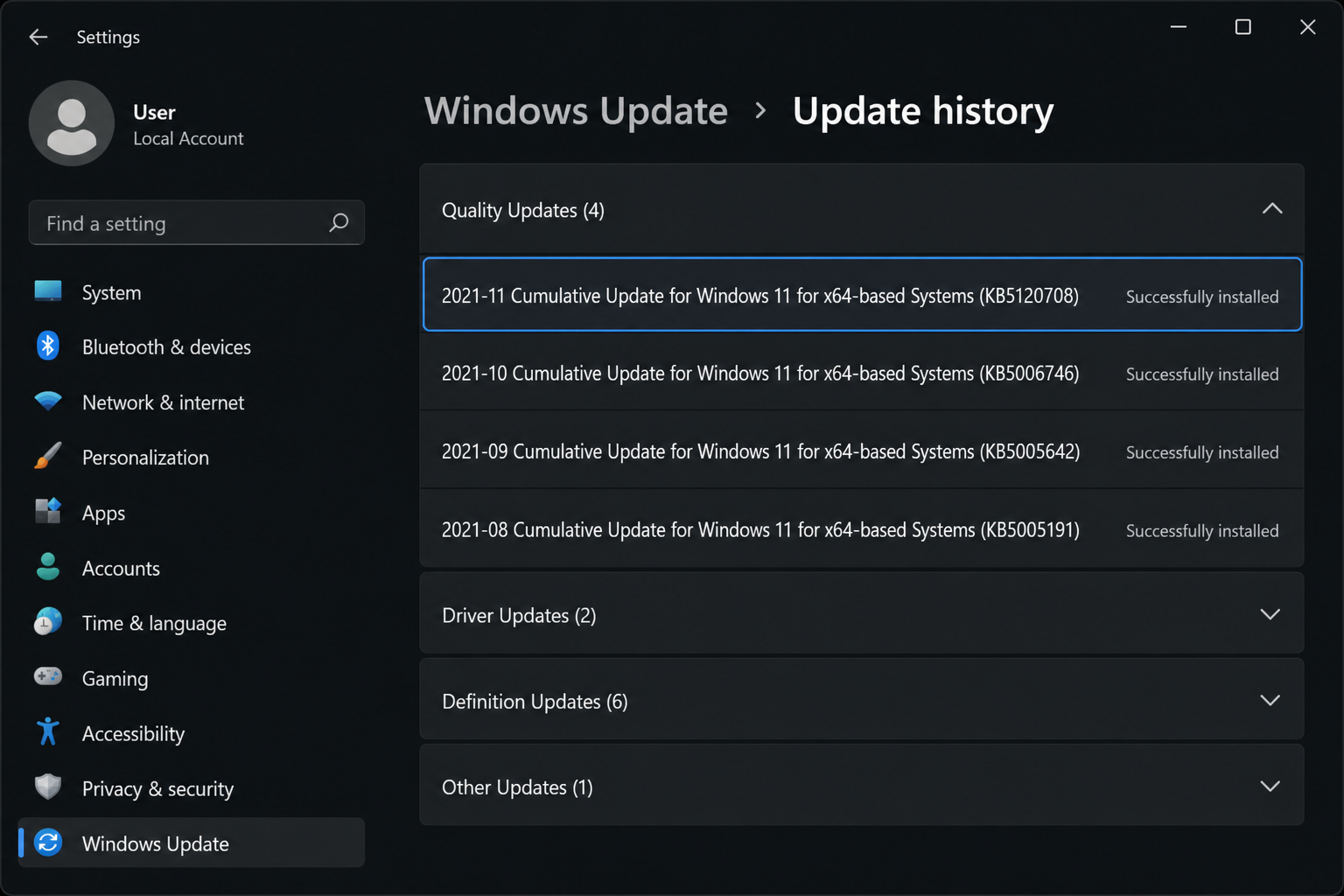
- Open Settings → Windows Update → Update History → Uninstall Updates.
- Find Update for Microsoft Windows (KB5120708) and select Uninstall.
- Restart your PC and confirm printing is restored.
- Pause Windows Update for up to 5 weeks while you wait for Microsoft’s permanent fix.
For a safer, structured approach to removing a bad patch, see our full guide on Windows Update rollback and how to remove a patch safely.
Is Windows 11 26H2 Affected?
This is the question on every IT administrator’s lips. The short answer is: yes, the underlying .NET Framework update that causes this printer PDF bug applies to the same .NET runtime versions that run on 26H2 systems. If you have already moved to 26H2 or are mid-migration, ensure your WPF applications have the AppContext switch applied before you install August’s cumulative updates.
Our detailed Windows 11 26H2 upgrade guide for IT teams covers the broader compatibility considerations you should work through before deploying the new feature update across a managed fleet — now is a good moment to review it alongside this printing issue.
What If You Cannot Edit the Config File? (Advice for End Users)
Many affected users will be running commercial or line-of-business software where they simply cannot modify the application’s config file — that is the vendor’s responsibility. Here is what to do in that situation:
- Contact the software vendor immediately. Most major vendors affected by this — including accounting platforms — have been alerted and are preparing emergency patches. Check the vendor’s support portal for a bulletin or hotfix.
- Check Windows Update for an out-of-band fix. Microsoft sometimes issues emergency out-of-band patches for widespread regressions. Keep Windows Update open and check manually every day or two.
- Use an alternative print path as a temporary measure. For PDF export, tools like Microsoft Print to PDF (accessed from any application’s print dialogue) bypass the WPF rendering stack entirely and may work as a stopgap.
- Roll back KB5120708 using the steps above if business continuity depends on printing and no other option is available.
How to Check Which .NET Version Is Installed
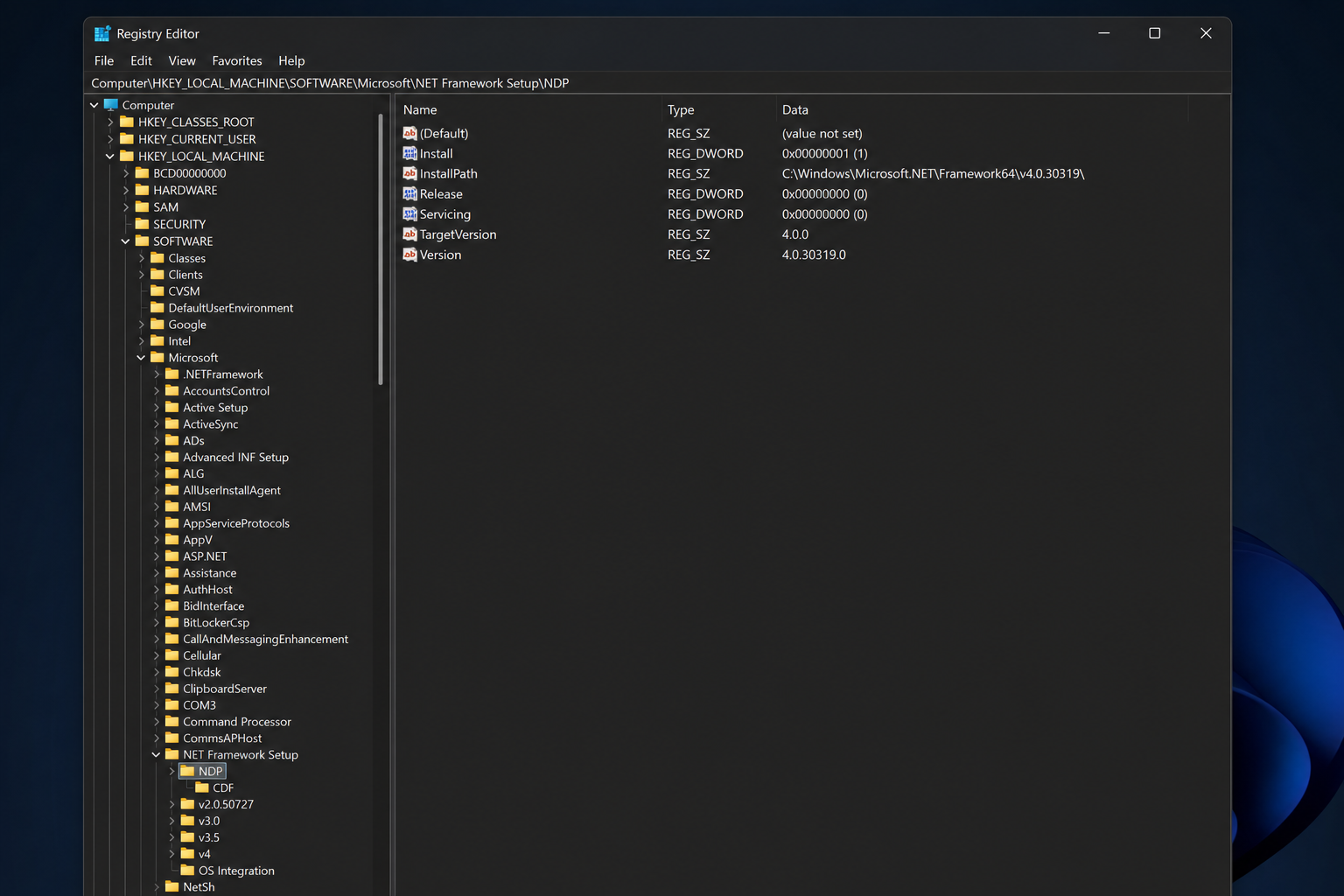
Before applying any workaround, confirm you are actually running one of the affected .NET Framework builds. The bug is present in .NET Framework 3.5 and 4.8.1 as patched by KB5120708, as well as companion updates for other supported builds released in August 2026. To check your installed .NET version:
- Press Win + R, type
regedit, and press Enter. - Navigate to
HKEY_LOCAL_MACHINE\SOFTWARE\Microsoft\NET Framework Setup\NDP. - Expand the version folders to see installed versions and release numbers.
- Cross-reference the release number against the Microsoft Windows release health dashboard to confirm your exact build.
When Will Microsoft Release a Permanent Fix?
Microsoft has not committed to a specific date, but the standard expectation is that a permanent fix will arrive with the September 2026 Patch Tuesday update (scheduled for 8 September 2026). Some remediation may arrive sooner via an out-of-band update if the scope of impact warrants it — given that this Windows 11 print error is hitting enterprise users hard, there is reasonable pressure to move quickly.
Once the permanent fix is released, you can remove the AppContext switch from any config files you edited. The switch itself carries no long-term risk if left in place, but removing it restores the full security hardening Microsoft intended.
Keep Your Windows 11 Licence Stable Through Bug Cycles
Patch bugs like this are a reminder that a genuine, properly activated Windows 11 licence gives you the fastest, most reliable access to Microsoft’s fix pipeline. If you are running an unactivated copy or a grey-market key, your update channel may be unreliable, delaying the security patches and bug fixes you need. Browse our range of Windows 11 Pro OEM licences — from €15.95 — for a legitimate, instant-delivery activation key that keeps your PC on the official update track.
FAQ
Which Windows 11 versions are affected by the August 2026 printer PDF bug?
The bug affects Windows 11 versions 24H2, 25H2, and systems running the August 2026 .NET Framework updates on 26H2. It is specifically tied to the .NET Framework cumulative updates (KB5120708 and companions) released on 11 August 2026 as part of Patch Tuesday. Windows 10 with the equivalent .NET update may also be affected in WPF applications.
Does this Windows printing fix require me to uninstall the August security update?
No — the preferred workaround does not require uninstalling the update. Microsoft’s recommended approach is to add an AppContext switch to the affected application’s config file. Uninstalling KB5120708 is only recommended as a last resort when the AppContext fix is not accessible, because doing so removes security protections the update was designed to deliver.
Are Microsoft Word, Excel, or Edge affected by the PDF rendering failure?
No. Microsoft Office applications and browsers like Edge use their own rendering and print stacks, which do not go through the WPF TrueType font subsetting engine that contains the bug. The PDF rendering failure is limited to applications built on Windows Presentation Foundation (WPF) using .NET Framework or .NET 8.
How do I know if my application uses WPF?
The clearest sign is a System.IO.FileFormatException error in the application’s crash log or event viewer when you attempt to print. You can also check the application’s installation folder — WPF-based apps typically include files such as PresentationCore.dll or PresentationFramework.dll. If you are unsure, contact your software vendor and quote KB5120708.
Will the AppContext switch affect my system’s security?
The switch disables the specific CMap and SBIT overflow protection introduced in the August 2026 update. This means the security hardening for that particular code path is inactive while the switch is enabled. Microsoft considers this acceptable as a temporary measure. Once a permanent fix is issued — expected with the September 2026 Patch Tuesday — you should remove the switch to restore full security coverage.
